Understanding and Overcoming Google’s Penguin Update

In the 3rd the week of April, Google released a major update the search giant dubbed “Penguin.” The algorithmic update was in fact announced ahead of time…we expected it to be pretty significant.

Now that over a month has passed since it was released, we’ve been able to get a better idea of the types of sites Google penalized and what affected webmasters can do to deal with the problem.

After scouring trusted sources and evaluating how sites we work with fared, we’re able to report some of the technical aspects of why sites were penalized and what can be done to reclaim lost rankings. Google reported that only 3% of sites were affected but after browsing through the message boards, we found that a lot more sites were likely affected – many of whom have been forced to lay off staff and scale back their enterprises.

(When Google’s last big update came out in 2010 (…dubbed “Panda”), the search engine also claimed it only affected 3% of sites when in fact many more were reporting rankings issue)

According to this video broadcast from SEOMoz (below), many sites caught up in the update may have had some undesirable linking practices, although there are other reasons too.

One principal issue is the type of links (…or footprints) going to your site.

Now you may be thinking paid vs. solicited links but that is most definitely NOT the issue.

The issue with links revolves around their relevancy to your content. If more than half of your links are similar to the content on your site, you may have been affected by the Penguin update.

The other big factor in play involves content.

For the last several years, Google has been arduously filtering out content that doesn’t meet its standards for quality. Sites across the ‘Net includes thousands of mediocre articles, blog posts and so on. Google claims this is to produce the best, most relevant results for its users.

Be that as it may – one thing is absolutely clear, you have to build content that provides true value and doesn’t just give search engines more stuff to sort out.

This of course isn’t the first time we’ve brought this up and it won’t certainly be the last.

Our friends at the Content Marketing Institute provides some good suggestions in developing content that both provides value to the reader and good, crawlable content for Google

From a content perspective, CMI suggests you:

  • Only use keywords when relevant. Don’t insert a keyword just for the sake of having a keyword
  • Make your content more social. Share it on Facebook, Twitter and Pinterest among other things
  • Create a useful resource people will want to refer to
  • Create content for other websites and blogs
  • Participate in online forums by adding valuable insights into the discussion
  • Regularly publish a newsletter
  • Maximize your conversion rate

Considering these points will help your site regain lost ground.

So there’s a quick summary of the Penguin update and what you can do to rebuild the damage done – both from an SEO and content perspective. Check out some related posts and the video below for more information.

If you think you haven’t had any of the issues mentioned, you can of course petition Google to manually review your site…but be careful. If you indeed have an issue, you may be penalized more.

And absolutely keep this mind – if you get an email from an SEO claiming they can fix any Penguin issues in a hurry, delete that email and pay it no mind.

Dealing with these issues will certainly take time.

Only work with a search engine optimization firm that truly understands this and who will not end up costing you more in the end.

Have you been affected by Penguin? If so, how are dealing with the impacts? Leave us a comment here on our blog or over on our Facebook today!


Other Posts You May Be Interested In

Penguin Update Targets Link Schemes and Low-Quality Content

3 Steps You Should Take Before Linking to Another Site

Answer these 23 Questions to Understand What Google Looks For

Google Panda Update Causes Some Sites to Lose Traffic, Revenues

Latent Semantic Indexing and Keywords – A New Way to Look at Copy

11 Steps to Increasing Keyword Saturation while Maintaining Valuable Content

Content Marketing over Traditional Advertising – Making the Case


Upcoming Google Update to Penalize “Over-Optimized” Sites

Rarely do we get a glimpse of a Google algorithm update before it occurs. But during a recent panel discussion at the SXSW event in Austin, Texas, Google’s spam chief Matt Cutts announced some minor tweaks to the search engine’s algorithm.

Dubbed the “Venice” update, Cutts said Google would punish sites that are too optimized for SEO, or what he called “over optimized” or “overly SEO’d” (…according to reports from HubSpot and Search Engine Land).

Although Cutts initially had planned not to announce the update ahead of time, he decided to go ahead and spill the beans following a question the panel received from an attendee at the SXSW event.

Basically, the question asked what Google was doing to prevent overly optimized content. For example, if you search for “three-winged widgets” on Google and the first result is just a keyword stuffed document, it won’t have much value to you, the reader.

In his response to the attendee’s question, Cutts explained the changes as “trying to make the algorithm more adaptive.” Sites that will be penalized will be those who are clearly engaging in keyword stuffing, exchanging too many links and any other practices that go beyond “…what a normal person would expect.”

I’ve done things SEO-e and other sources have suggested I do. Will I have to worry about being penalized for following standard recommendations?

A similar question was asked of Cutts by our friend Danny Sullivan at Search Engine Land and the short answer is no, it won’t.

Those who will be penalized are sites whose content is driven by keywords rather than topics. If you’re selecting topics based on what you’re audience wants you shouldn’t have anything to worry about provided you’re not stuffing your content with keywords. As we’ve said before, if you spam your content with keywords to the point that it doesn’t read naturally, your site will be either ignored or penalized.

In a follow-up to Cutts’ response, Bing’s Duane Forrester added that social sharing is an important signal as to how others value your content. If others think you have great content, they will “…amplify it” Forrester explains.

“If you’re not engaged socially, you’re missing the boat because the conversation is happening socially about you and about your content. Those are really important signals for us,” explains Forrester.

In light of these revelations by Cutts, we want to take a moment to reiterate the old rule of thumb.

  • 2-3 separate, unique keywords on a page
  • Vary your use of keywords (i.e. singular, plural, stemming, synonyms)
  • Above all, make sure your copy reads naturally. If it feels spammy to you, then it likely contains too many keywords

In the end, if you’re writing with your readers in mind first and the search engines second, you should be okay. Make your readers the first priority and the rankings will follow provided your site is easily crawlable so the bots can actually read and index your content.

Read some of our prior posts on keywords and how you can maximize keyword instances without your content being too spammy.

Are you concerned about Google’s Venice update? What are your thoughts on penalizing sites for over-optimization?

Other Posts You May Be Interested In

3 Steps You Should Take Before Linking to another Site

Latent Semantic Indexing – A New Way to Look at Keywords

Standard Keyword Research Won’t Always Tell you what your Prospects are Looking For

11 Steps to Increasing Keyword Saturation while Maintaining Valuable Content

Mobile Smartphones and SEO

You or someone you know in all likelihood owns a mobile smartphone (…like the I-Phone, Android or something similar) and accesses the Internet with it. These devices have grown by leaps and bounds in the last few years – projections are that one day, more people will access the Internet with a handheld device than laptops or traditional desktop machines.

With that said, now is the time to consider integrating a mobile version of your website into your online marketing strategy.

When examining this from a purely SEO standpoint though, one thing you must understand before anything:

Search engines like Google, Bing and Yahoo don’t give a hoot if you have a mobile compatible web site or not

That’s right – websites designed for mobile users do NOT receive any special treatment from the search engines. In other words, searches from a mobile smartphone are treated just like any other search from a regular computer.

If you take out your smartphone and do a search, you’ll notice that search engines do not rank mobile sites higher unless you add “mobile” or some other unique keyword to your phrase.

Let’s be clear though – having a site optimized for mobile users is absolutely important. However, this is more of a usability issue and not necessarily a ranking issue.

From a search engine optimization standpoint though, it’s highly unlikely your mobile site will ever outrank your main site.

The big impact in terms of SEO and mobile smartphones is local search. Here’s where sites designed for mobile devices are treated differently than desktop sites (…notice, they treat them differently, not better).

Google and others essentially assume that a mobile search is local. In fact, statistics show that there is a 33% or higher chance you’re looking for something local when using your smartphone.

For example, if you type in “Best Buy” on your mobile device, it’s assumed you’re looking for the local Best Buy store in your town.

Another caveat of mobile search (..exclusive to Google) is the fact that Google Places is clearly pushed to the top in a majority of local related keyword searches.

Therefore, if your customers are local, it’s quite clear you need to have a presence in something like Google Places.

Aside from local searches though, there isn’t any special treatment for mobile-enabled websites.

With this assumption in hand, your best bet is to drive all traffic to your main site and put your mobile optimized site with a sub-directory (i.e. http://www.yoursite.com/mobile) rather than as a stand-alone subdomain (i.e. http://mobile.yoursite.com).

Setting up your mobile site this way carries several benefits, including:

  • Content, trust and authority of your main site (…since it’s likely been around much longer) will be available to your mobile users
  • You can maintain focus of your link building on your main site rather than having to split your efforts between multiple sites
  • Setting cookies is less troublesome when you don’t have to go cross domain

If you’ve setup a mobile site with its own stand-alone domain, you’re probably experiencing difficulty in getting the new domain to rank. If so, you can setup a 301 re-direct to a mobile domain attached to your main website (i.e. http://www.yoursite.com/mobile).

From a marketing and usability standpoint, mobile compatible sites are becoming an absolute must, especially considering these devices are currently experiencing an explosive 400% growth in usage. Much of your content will stay the same – it will just need to include coding to make it compatible for the ubiquitous small screens mobile smartphones have.

But considering the fact that only a tiny fraction of companies have added mobile sites, you will likely have a distinct competitive advantage by starting one now rather than waiting another year or two.

Other Posts you May Be Interested In

Google and Merging of Search and Social Media

Outlook for Search – Building High Rankings in 2012

Preparing for the Mobile Revolution, Part I

Preparing for the Mobile Revolution, Part II

Outlook for Search – Building High Rankings in 2012

Well, a New Year has passed and we bid farewell to 2011. It was certainly an exciting year, especially in search and online marketing which saw changes occur at warp speed.

Over the last few weeks of 2011, we took a break to assess the state of search engine optimization and where things were headed going into 2012. We do this in order to help our clients (…and readers of this blog) better understand where they should focus their online marketing efforts.

After reflecting on where we’ve been and where we’re going, we quickly realized that the lines between different types of search – namely organic, local, mobile and social – are now being blurred more than ever. Rather than web search strictly being the center of activity online, social is increasingly becoming the focus.

According to an exclusive web tutorial from Planet Ocean, web search was the sun and other types of search (…or planets) revolved around it. Now, instead of web search being the sun, social is quickly becoming the center of the universe with other types of search (…or planets) revolving around it.

As we’ve said here many times over the last year, being social is a critical strategy to being successful online – this will become even more critical in the coming year. A cursory review of search results for a variety of terms shows social mentions and engagement alongside traditional webpages.

Social is being aggressively integrated in Bing, who has partnerships with Facebook, Skype and Twitter. Google has basically bet the farm on its new social network Google +.

From these arrangements and others, we can ascertain that social sharing will increasingly integrate with web search. Going forward, social shares or votes will increasingly be the new links.

How many have liked, +1’d or otherwise made a comment regarding content on your site?

So how can I ensure my site continues to rank high in 2012?

Dominating your market online in the new year will require some tried and true methods mixed with some new ways of engaging your audience online.

Since the web has become increasingly social, it’s become increasingly democratized as well. Users will more and more be the driving force in determining which social networking platforms you ultimately adopt.

The key to all of this though is content – as in years past, successful online marketing will be driven by your ability to create reference grade content that helps the reader. In turn, this can lead to true engagement that builds trust and value.

Rather than a few pages earning links, success online will hinge more on how socially engaging your content is.

The more likes, +1s and buzz your content has, the better your business will do.

Besides content itself, freshness will also be a driving factor in maintaining and building high search rankings. It’s increasingly become clear that Google and others are placing a high value on ‘fresh’ content. Just in the last two months, we’ve seen Google make updates to its algorithms to reward sites with fresh content, especially in areas that are always changing.

This update though has sadly penalized some sites with great ‘evergreen’ content that’s been around awhile but still valuable. Repurposing this content will help you get around this ‘freshness’ problem, especially if you experienced a drop in rankings due to this latest update.

Also in 2012, expect to see more firms using social media tools for product development and testing as well as technical support.

What about mobile-based search? Will it continue to grow in 2012?

An emphatic yes!! It’s projected that by 2015, more users in the U.S. will access the Internet through their smartphones or tablets than a regular computer.

Mobile search is deeply tied into local search with over 40% of searches on a mobile device being for something local like a restaurant, doctor’s office or brick and mortar store. According to Google, 44% of searches from a mobile device in the 2011 holiday shopping season were for store locations and last-minute gifts.

With mobile devices, users can seamlessly float between mobile, local and product search as well as their social media activities.

In 2012, it’s imperative that local business establish their presence on places like Bing Local, Google Places, Foursquare and others. Don’t be hesitant to allow reviews – customer reviews give you an opportunity to address grievances and open yourself up to new ways of engaging customers.

So there you have it – things will continue to move at wharp speed in this new year – social and mobile is most certainly revolutionizing how people interact and find things they need.

Stay tuned to our search engine optimization blog as we slice and dice the trends and developments in the search marketing world. Most of all relax and have fun with the possibilities the online sphere will bring in 2012.

Other Posts You May Be Interested In

7 Strategies for Maintaining ‘Fresh’ Content

Preparing for the Mobile Revolution – Part I

Preparing for the Mobile Revolution – Part II

3 Ways Social Media, SEO and Content Marketing Work Together

Reputation Management – Maintaining & Enhancing your Company’s Good Name

Why Optimized Press Releases Still Matter in a Post Panda World

Following Google’s Panda update earlier this year, many syndication and content ‘farm’ websites experienced a sharp drop in rankings. Many press release distribution outlets like PRLog.com were hit pretty hard in this update.

We’ve always extolled (…and still do) the value of generating a steady flow of press releases announcing news at your company – a new product, new hire or a professional award or recognition – are just a few newsworthy topics you can announce through a press release.

Considering the fact that 92% of journalists use search engine feeds like Google News or Yahoo! News to find newsworthy topics (…daily for 81% of journalists according to research firm Marketing Sherpa), not developing a steady schedule of press releases can put you at extreme disadvantage.

And recent research from TEKGroup International analyzing journalists on media relations practices found over 70% journalists read one or more blogs daily…just under 30% regularly use social media in their jobs and approximately 37% subscribe to RSS feeds…50% regularly visit Google News.

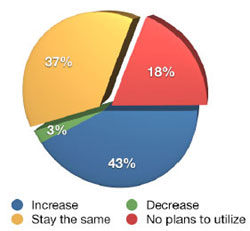
We can even glean more information from the 2011 Social Media Marketing Industry Report from the Social Media Examiner. Over 80% of respondents in this survey say they plan to either increase press release frequency or keep it the same.  Of those respondents who say they will increase their frequency of press releases (43%), approximately 52% were small business owners while only 24% were larger companies.

Another interesting fact from the report – when asked to rank all types of marketing they were using or planning to implement, respondents ranked press releases at #4 at 57%, just below event marketing.

Despite the fact Google’s Panda update somewhat diminished the value of links from distribution sites, we can see still see the inherent value of developing newsworthy press releases.

Remember one important point – write press releases with both the search engines and social media networks in mind.

Doing so will ensure you reach both your target audience and hungry journalists looking for a great news topic.

Proper press release optimization and targeting not only helps you rank high in Google News and other outlets, they help you engage both your audience and journalists. Eventhough the link value has diminished somewhat, be sure you still include press releases in your online marketing strategy.

Related Posts

5 Common Mistakes that Stop Press Releases Cold

7 Things Google’s Farmer Update Penalized Sites For – And What you Can Do About It

Fast Track your PR with Paid Press Release Distribution Outlets

Free Press Release Distribution – A Great Way to Get your PR Noticed